Inventory Management

Your inventory, always right

Your inventory, always right

Your inventory,
always right

See every unit's status, size, owners, and payment plan in one place - and book it in seconds.

See every unit's status, size, owners, and payment plan in one place - and book it in seconds.

  • Hold a unit. No one else can book it

    Attach the payment plan

  • Set carpet and built-up areas once

    Book from your phone

Hero Image
Problem

Everyone has a different Excel sheet

Problem

Everyone has a different Excel sheet

Two salespeople sell the same flat.

Two salespeople sell the same flat.

"Is 402 free?" - three phone calls to find out.

"Is 402 free?" - three phone calls to find out.

Carpet area says one thing. The agreement says another.

Carpet area says one thing. The agreement says another.

Every buyer gets a different payment plan.

Every buyer gets a different payment plan.

One booking takes a full afternoon of paperwork.

One booking takes a full afternoon of paperwork.

The site office can't see what's sold.

The site office can't see what's sold.

How it Works

Booking, done in 30 seconds

Step 1

Pick the unit.

Open the list. See what's free. Held units are locked - no confusion.

Step 2

Details fill in on their own.

Size, owners, payment plan - already attached. Nothing to type again.

Step 3

Confirm.

The unit shows "booked" for everyone, instantly. The receipt and payment schedule follow.

Features

Set up once. Sell without mistakes

Bento Grid Image

Hold Inventory

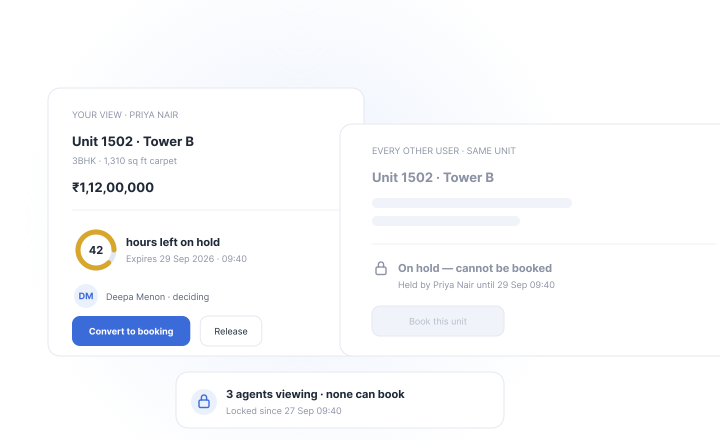
A buyer needs two days to decide? Hold the unit. It's locked for everyone else. No one can book it behind your back.

Bento Grid Image

Hold Inventory

A buyer needs two days to decide? Hold the unit. It's locked for everyone else. No one can book it behind your back.

Bento Grid Image

Multiple Owners

Husband and wife buying together? Add both names on one booking. Papers come out right the first time.

Bento Grid Image

Multiple Owners

Husband and wife buying together? Add both names on one booking. Papers come out right the first time.

Bento Grid Image

Area Management

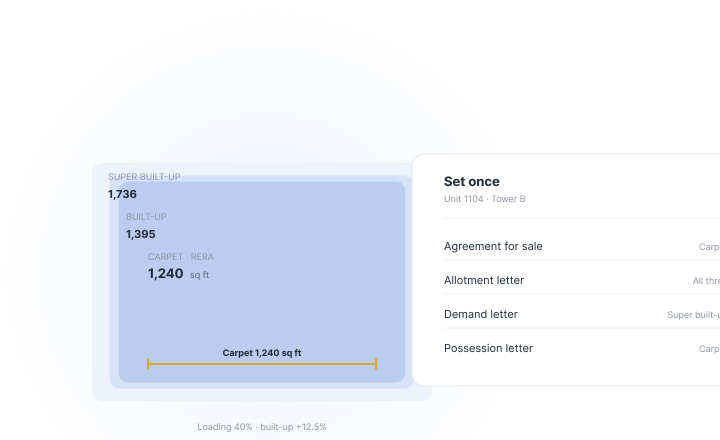
Carpet, built-up, super built-up - set once. The same numbers appear on every document. No arguments at possession time.

Bento Grid Image

Area Management

Carpet, built-up, super built-up - set once. The same numbers appear on every document. No arguments at possession time.

Bento Grid Image

Area Management

Carpet, built-up, super built-up - set once. The same numbers appear on every document. No arguments at possession time.

Bento Grid Image

CLP Plans

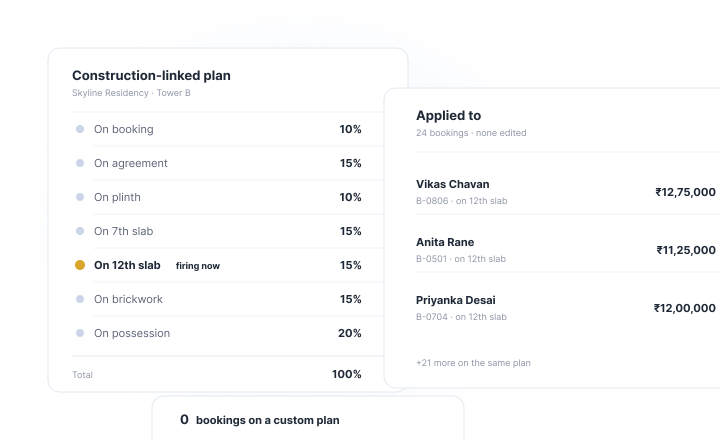
Make a payment plan for each project. Stage by stage, slab by slab. Every booking follows the same plan.

Bento Grid Image

CLP Plans

Make a payment plan for each project. Stage by stage, slab by slab. Every booking follows the same plan.

Bento Grid Image

CLP Plans

Make a payment plan for each project. Stage by stage, slab by slab. Every booking follows the same plan.

Bento Grid Image

Mobile App

Your whole inventory, on your phone. Check, hold, or book from the site office. Close the deal while the buyer is standing there.

Bento Grid Image

Mobile App

Your whole inventory, on your phone. Check, hold, or book from the site office. Close the deal while the buyer is standing there.

Bento Grid Image

Mobile App

Your whole inventory, on your phone. Check, hold, or book from the site office. Close the deal while the buyer is standing there.

Watch a booking happen in 30 seconds.

Watch a booking happen in 30 seconds.

Business Benefits

What this changes for your business.

No unit sold twice

Held means held. Booked means booked. No apology calls. No refunds. No court.

Fewer fights at possession

Areas and owners recorded right, from day one. Handover stays smooth.

One plan for everyone

Payment plans you set - not ones agents invent. Every installment arrives on schedule.

Book on the spot

The buyer is ready at the site office. Now, so are you.

FAQ

Inventory management - your questions, answered.

These questions are asked by many of our users

FAQ

Inventory management - your questions, answered.

These questions are asked by many of our users

What is property inventory management software?

It's software that keeps a live list of every unit in every project - what's free, what's held, what's booked, along with sizes, owners, and payment plans. Your whole team sees the same list, so units are quoted correctly and never sold twice.

How does holding a unit prevent double bookings?

When a salesperson holds a unit, it locks for everyone else for a set time. Nobody else can book it until the hold ends or becomes a booking. Two people can never sell the same flat - the system won't allow it.

Can one booking have multiple owners?

Yes. Add one or several owners - spouses, family members, or partners - under a single booking. Every owner's details go in at booking time, so agreements and documents come out right.

What are CLP (Construction Linked Payment) plans?

CLP plans link a buyer's installments to construction stages - foundation, slabs, finishing, possession. In Build Formula, you create a CLP plan for each project, and every booking follows it automatically as work progresses.

Can I manage carpet, built-up, and super built-up areas separately?

Yes. Set all three area types for every unit once. The same figures then appear in quotes, agreements, and documents - so buyers see one consistent number everywhere.

Is there a mobile app for managing inventory?

Yes. The Build Formula mobile app puts your live inventory in your pocket - check availability, hold a unit, or complete a booking right from the site office.

Does Build Formula's inventory management work outside India?

Yes. Real estate teams across India use Build Formula, and we’re expanding across the USA, Canada, and Africa. Every plan includes onboarding, training, and ongoing support.

Sell every unit. Only once.

Free setup. We train your site team too.

Sell every unit. Only once.

Free setup. We train your site team too.

Sell every unit. Only once.

Free setup. We train your site team too.