
Plan the quantity
Track what's issued
See what's left
Catch the leak early
Set the number, Watch it move
Step 1
Set what you planned
For every material on the project, enter the estimated quantity and the estimated amount before work begins.
Step 2
Issue against it
Every issue to site or to a contractor is recorded against that same material line, as it happens.
Step 3
See what's left
Remaining quantity and remaining amount update with every issue, so the current position is always on screen.
Five numbers, One line per material
The same five answers for cement, steel, sand, or tiles - on every project you run.

What a visible number changes.
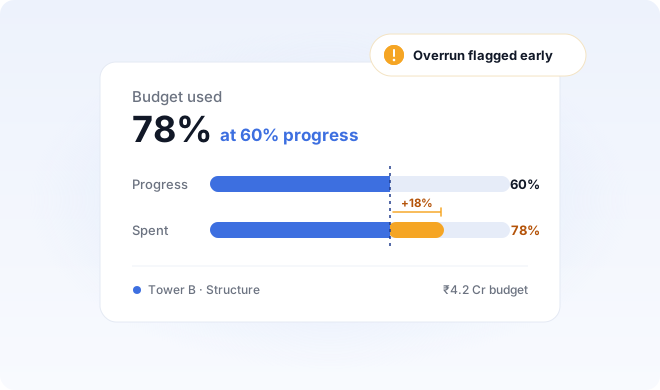
Catch the overrun at sixty percent
See the gap while the project is still running, not when the last bill comes in.
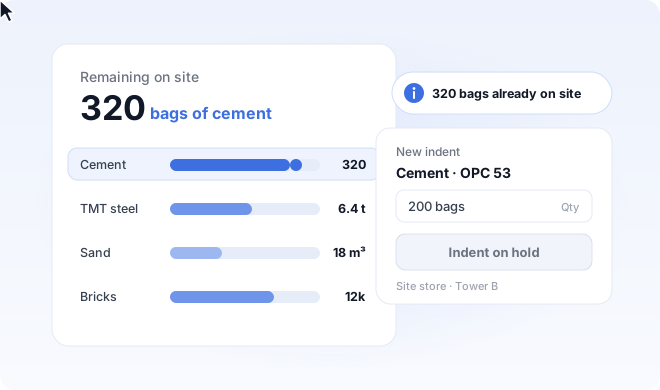
Stop re-ordering what you have
Remaining quantity is on screen before anyone raises the next indent.
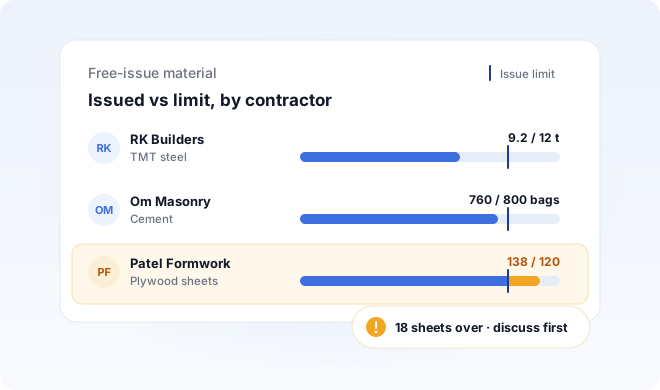
Hold contractors to what was issued
Free-issue material carries a visible limit, so excess gets discussed before it becomes a write-off.

Protect the margin you estimated
The number you costed and the number you spent finally sit in the same view.
What is budgeting in Build Formula?
Budgeting comapres what each material was planned to cost against what it has actually cost, while the work is still running. You see the remaining quantity and amount for every material, so an overrun shows up early - not at handover.
How is this different from tracking the budget in Excel?
A spreadsheet only knows what someone remembered to type into it. Issues recorded at the store don't reach it, so the remaining figure is out of date the moment material moves. In Build Formula, the issue and the budget are the same record - so remaining quantity and remaining amount are always current, and nobody has to reconcile anything at month end.
Does it track budget in quantity or in money?
Both, for every material. You set an estimated quantity and an estimated amount, and you see remaining quantity and remaining amount side by side. That matters because material can look fine in bags while the money has already run over, or the reverse when rates move mid-project.
How is this different from the Estimation module?
Estimation is what you do before work begins - pricing items and working out how much material each stage will need. Budget is what happens after: watching that plan get consumed, and seeing what's left. The estimate sets the number, and the budget defends it.
Can I see the remaining budget for one material across a whole project?
Yes. Every material carries its own planned, issued, and remaining figures for the project, so you can look at cement across the entire build rather than stage by stage.
Can I track budgets for more than one project at a time?
Yes. Each project keeps its own material budget, and one login shows them all. Builders running several sites can compare consumption across projects without exporting anything.
Does it work for builders outside India?
Yes. Real estate teams across India use Build Formula, and we’re expanding across the USA, Canada, and Africa. Every plan includes onboarding, training, and ongoing support.