Accounts

Raise it. Send it. Collect it.

Raise it. Send it. Collect it.

Generate CLP demands in one click, send them by WhatsApp, email, or SMS, and watch every collection land in real time.

Generate CLP demands in one click, send them by WhatsApp, email, or SMS, and watch every collection land in real time.

  • Demands send themselves

    Interest calculates itself

  • Receipts print instantly

    Collections update live

Problem

The money is owed. It just isn't asked for

Problem

The money is owed. It just isn't asked for

Demands go out late

Someone types them one buyer at a time, so the slab was cast weeks before the letters went out.

Demands go out late

Someone types them one buyer at a time, so the slab was cast weeks before the letters went out.

Interest gets calculated by hand

Or quietly forgotten, because working it out per buyer takes longer than letting it go.

Interest gets calculated by hand

Or quietly forgotten, because working it out per buyer takes longer than letting it go.

Nobody knows what's pending

Received, outstanding, and still to come sit in three files that nobody has reconciled this month.

Nobody knows what's pending

Received, outstanding, and still to come sit in three files that nobody has reconciled this month.

Receipts happen when someone remembers

The buyer pays on Monday and asks for the receipt on Thursday, because nobody sent one.

Receipts happen when someone remembers

The buyer pays on Monday and asks for the receipt on Thursday, because nobody sent one.

Chasing depends on who has time

Overdue buyers get a call if the day is quiet, and no call at all if it isn't.

Chasing depends on who has time

Overdue buyers get a call if the day is quiet, and no call at all if it isn't.

Invoices are built by hand

The same figures typed again into a template, with a rounding error nobody notices until later.

Invoices are built by hand

The same figures typed again into a template, with a rounding error nobody notices until later.

How it Works

Set the plan once, It runs itself

No typing demands one by one. No working out interest on a calculator. No chasing by hand.

Step 1

Configure the CLP

Set the construction-linked payment plan for the project once, with its stages, amounts, and due dates.

Step 2

Demands raise and go out

The system generates demands as the plan falls due and sends them by WhatsApp, email, or SMS - one buyer, or a whole project at once.

Step 3

Money arrives and records itself

Payments are receipted, interest calculates on anything overdue, and collection figures update on their own - with no manual entry.

The Record

Every buyer, every unit, one place

Find anything in seconds, without asking anyone.
Auto Demand Generation

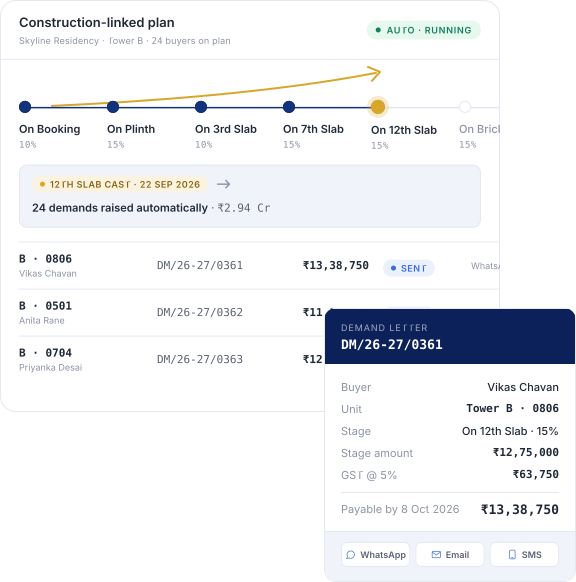
Demands raise themselves according to the construction-linked plan, so nothing waits on someone remembering.

One-Click Demand Generation

Generate a demand letter instantly against the configured CLP, without typing a single figure.

Multiple Demand Generation

Raise demands for every buyer in a project with one click, instead of working through them one at a time.

Interest Calculation

Interest on overdue payments calculates automatically from the demand due date, with nothing worked out by hand.

Demand Dispatch

Send demands straight to buyers over WhatsApp, email, or SMS - where they'll actually be read, not left in an inbox.

PDF Download

Download any generated demand letter as a PDF, ready to send, print, or file.

Auto Demand Generation

Demands raise themselves according to the construction-linked plan, so nothing waits on someone remembering.

One-Click Demand Generation

Generate a demand letter instantly against the configured CLP, without typing a single figure.

Multiple Demand Generation

Raise demands for every buyer in a project with one click, instead of working through them one at a time.

Interest Calculation

Interest on overdue payments calculates automatically from the demand due date, with nothing worked out by hand.

Demand Dispatch

Send demands straight to buyers over WhatsApp, email, or SMS - where they'll actually be read, not left in an inbox.

PDF Download

Download any generated demand letter as a PDF, ready to send, print, or file.

Auto Demand Generation

Demands raise themselves according to the construction-linked plan, so nothing waits on someone remembering.

One-Click Demand Generation

Generate a demand letter instantly against the configured CLP, without typing a single figure.

Multiple Demand Generation

Raise demands for every buyer in a project with one click, instead of working through them one at a time.

Interest Calculation

Interest on overdue payments calculates automatically from the demand due date, with nothing worked out by hand.

Demand Dispatch

Send demands straight to buyers over WhatsApp, email, or SMS - where they'll actually be read, not left in an inbox.

PDF Download

Download any generated demand letter as a PDF, ready to send, print, or file.

Raise a month of demands in the time this takes to read.

Raise a month of demands in the time this takes to read.

The Difference

What happens when demands stop waiting

Most builders don't have a collections problem. They have a delay problem that turns into a collections problem.

Money arrives sooner

Demands go out when the stage falls due, not weeks later when somebody finds the time.

Interest stops being written off

Overdue interest calculates on its own, so it gets charged instead of quietly forgiven.

Your team stops chasing

Reminders go out on schedule, so following up isn't the job of whoever happens to be free.

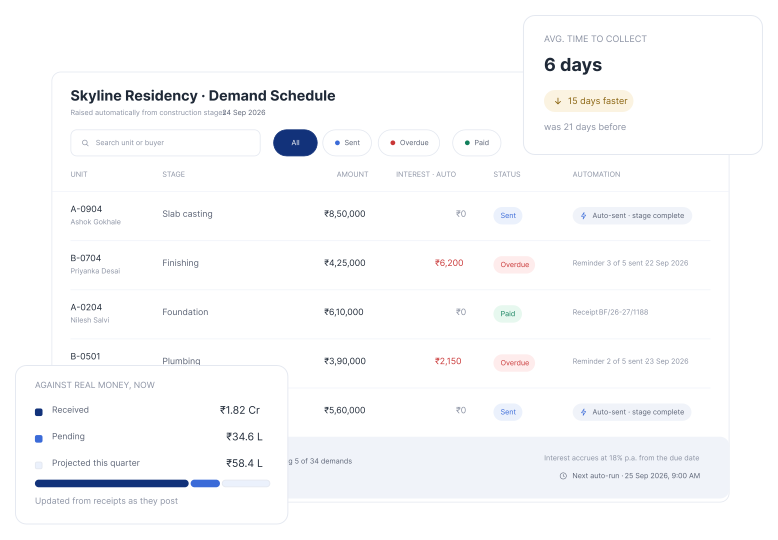
Plan against real money

Received, pending, and projected sit together, so contractor commitments are made against facts.
Application Mockup
Application Mockup
FAQ

Collections - your questions, answered.

These questions are asked by many of our users

FAQ

Collections - your questions, answered.

These questions are asked by many of our users

What is accounts management software for real estate?

It tracks the money buyers owe you after a booking. It raises demands, add interest on late payments, issues receipts, and shows what's paid and what's pending. No more spreadsheets or manual letters.

What is a construction-linked plan, and how does it work here?

A construction-linked plan ties a buyer's payments to stages of construction rather than to fixed calendar dates. In Build Formula, you configure the plan once for a project - its stages, amounts, and due dates - and demands then generate automatically as each stage falls due. You don't rebuild the schedule for every buyer.

Can demand letters be generated and sent for many customers at once?

Yes. Raise a demand for a single buyer in one click, or generate demands for every buyer in a project together. Each one follows the configured CLP and can be sent straight to the buyer over WhatsApp, email, or SMS, or downloaded as a PDF for your records. Sending over WhatsApp matters in practice - an email demand can sit unread for a week, while a WhatsApp message is usually seen the same day.

Is interest on late payments calculated automatically?

Yes. Interest calculates from the demand's due date without anyone working it out by hand. That matters because manually calculated interest is usually the first thing a busy team stops charging - and across a project it adds up to a meaningful sum.

Are payment reminders sent automatically?

Yes. Auto collection setup lets you automate payment schedules and reminders, and reminders reach buyers over WhatsApp, email, or SMS. Buyers get followed up on a schedule rather than whenever someone has a free afternoon, so chasing stops being a person's job.

Can I see received, pending, and projected collections together?

Yes. Financial collection shows all three in real time, filtered by project, period, customer, or status, and presented as graphs where a trend is easier to read than a number. That combination is what makes it possible to commit to contractor payments against facts rather than hope.

How is this different from the Customer Management module?

Customer Management holds the records - who booked which unit, on what terms, with which documents. Accounts handles the money that follows from those bookings: demands, collections, invoices, and receipts. One is the file, the other is the finance.

Can developers outside India use it?

Yes. Real estate teams across India use Build Formula, and we’re expanding across the USA, Canada, and Africa. Every plan includes onboarding, training, and ongoing support.

Ready to Keep Your Collections on Track?

Know what's paid, what's due, and what needs attention - without chasing it all manually.

We set it up. Free.

Ready to Keep Your Collections on Track?

Know what's paid, what's due, and what needs attention - without chasing it all manually.

We set it up. Free.

Ready to Keep Your Collections on Track?

Know what's paid, what's due, and what needs attention - without chasing it all manually.

We set it up. Free.